How to Find Your MEPCO Reference Number
Last checked 26 September 2026
Your reference number is the key to everything online: checking, printing and paying your MEPCO bill. It is printed at the top of every bill, and there are several places to find it if the bill is gone.
Where to find it on your bill
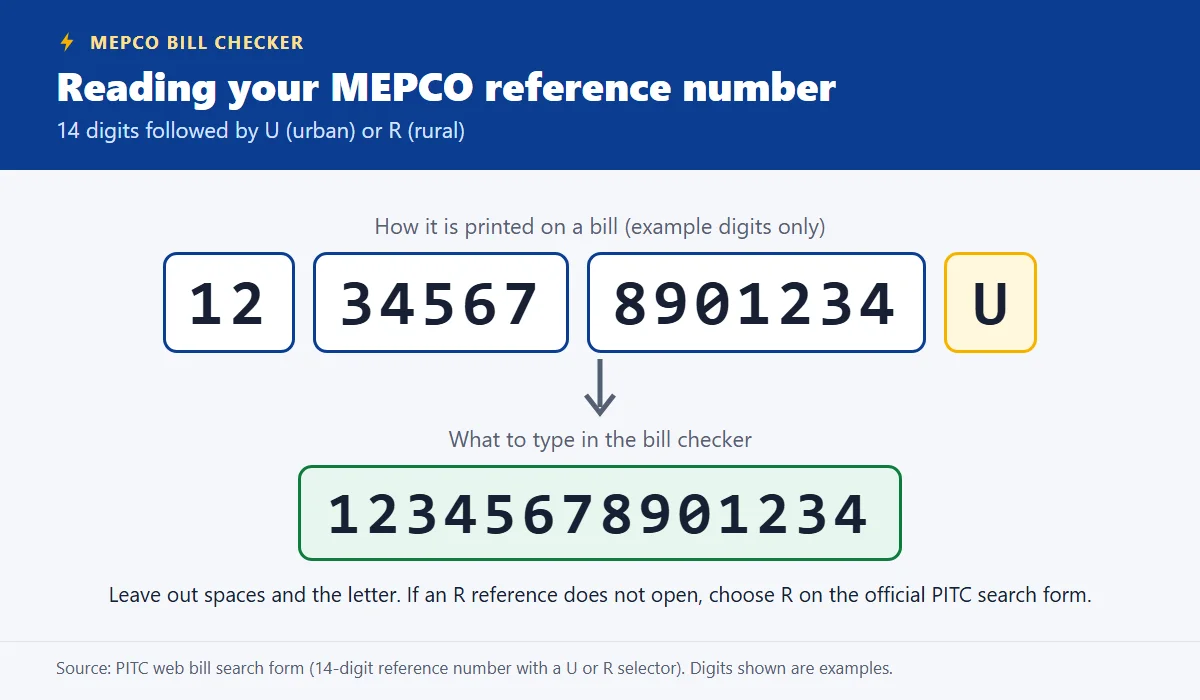
- The reference number is printed near the top of the bill. It has 14 digits followed by the letter U or R.
- The customer ID is a separate number on the same bill. The official bill website accepts it too.
When you type the reference number into the MEPCO bill checker, enter only the 14 digits. Leave out spaces, dashes and the letter.
What the U or R means
The letter after the 14 digits marks the connection as urban (U) or rural (R). The official bill search form has a small box after the number where you choose U or R. U is selected by default. If a rural bill does not open from our checker, use that form and pick R.
Lost your bill? Where else to look
- An old bill or a photo of one. Any past bill for the same connection has the same reference number.
- Your banking or wallet app. If you paid a MEPCO bill online before, the payment history or saved billers usually show the reference number.
- A payment receipt. Bank and wallet receipts for a MEPCO bill normally show the reference number.
- The landlord or the previous occupant. If you rent, the owner's copy of the bill has it.
- MEPCO itself. Visit your MEPCO customer service centre or sub-division office. MEPCO's FAQ says duplicate bills are available at its customer service centres.
Why there is no search by name or CNIC
The official MEPCO bill service run by PITC offers only two ways to search: reference number and customer ID. No official page shows a MEPCO bill from a name, CNIC or meter number.
Once you have it
- Check your MEPCO bill online and save it as a PDF.
- Print a duplicate MEPCO bill to pay at a bank counter.
- Pay the bill from your banking app with the same number.
- Save the number in your phone's notes so you never have to hunt for it again.
- Register for the 2026 subsidy check if your bill carries the QR code.
- Register the occupant's CNIC and mobile number on PITC's portal.
Sources: PITC bill service search form (bill.pitc.com.pk/mepcobill), MEPCO FAQ page. Checked 26 September 2026.